You have 80 tabs open because closing them feels like losing your work.
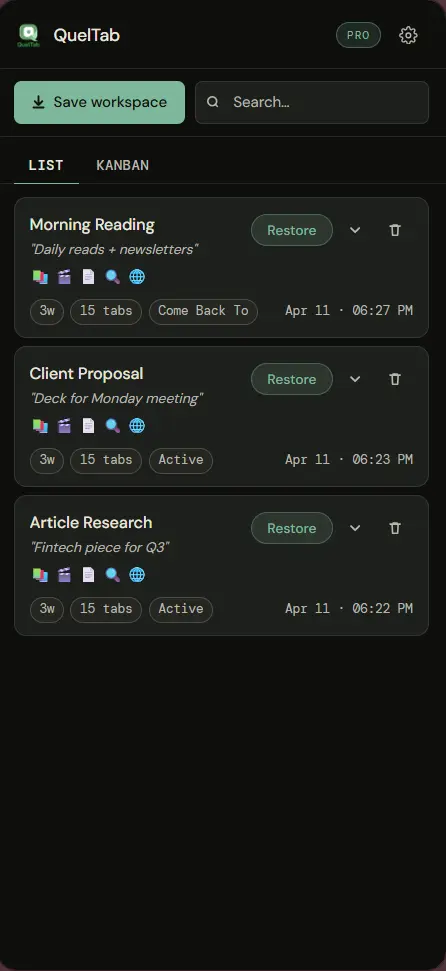
QuelTab saves your tabs as real JSON files in your Downloads folder — not in the cloud, not locked in the browser. Close everything. Reopen exactly where you left off.
Chrome 116+. No sign-up. No account.
Three things that make it different
Not another bookmark manager. Not another session sync tool. A different approach entirely.
Real files in Downloads
Every workspace saves as a JSON file on your hard drive. Not in an extension database that vanishes when you uninstall. Yours, permanently.
Multi-window workspaces
Working across three windows? QuelTab captures all of them together as one named workspace. Reopen with every window in its place.
Nothing leaves your machine
No account. No sync. No server ever sees your tab data. Private domain support lets you mark sensitive work so it's never included in exports.
Named, sorted, ready to reopen
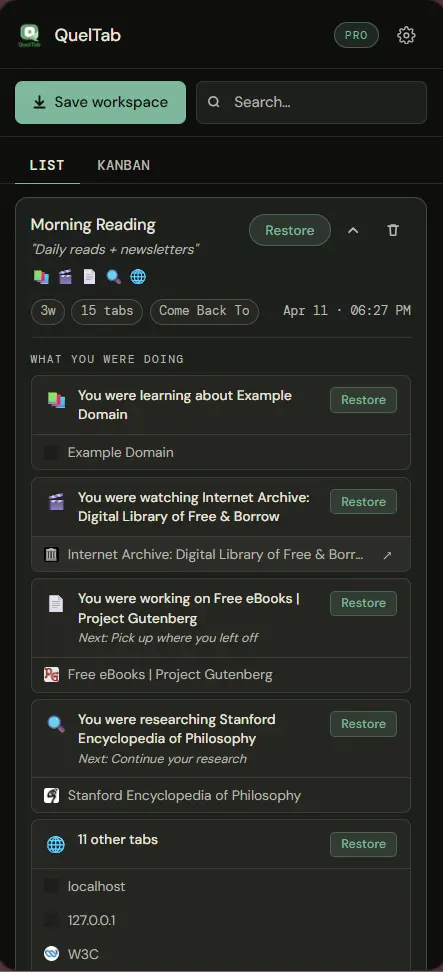
QuelTab automatically groups your tabs by what you were doing — research, shopping, coding, email. Give the workspace a name, add a note, drop it into a column. Come back tomorrow and know immediately what you were in the middle of.
Tabs reopen fresh. Page state is not preserved — that's honest, not a bug.
The obvious options all have the same problem
Every workaround for tab overload makes a trade-off you don't realise until it bites you.
Extension storage
Session managers that save inside the extension lose everything when you uninstall, when Chrome profiles corrupt, or when you switch computers.
Cloud-dependent tools
Sync services tie your browsing history to an account on someone else's server. Monthly fees. Privacy questions. A service that can shut down.
Built-in browser features
Tab groups and reading lists don't survive restarts reliably, can't capture multiple windows as one workspace, and offer no way to export or back up.
Simple. One-time. No subscription.
Try it free. If it earns a place in your workflow, upgrade once and own it forever.
- 2 workspaces
- Multi-window capture
- Export to JSON
- Private domains
- Kanban board view
- Unlimited workspaces
- Multi-window capture
- Export & import workspaces
- Encrypted backups (AES-256)
- Kanban board view
- All future updates
Stop hoarding tabs.
Start owning your work.
Free to install. No account. Your files, your machine.
Chrome 116 or later · No sign-up · Works offline